SharePoint Portal Server 2003 Search Web Service Tester

If you work with SharePoint Portal Server 2003, you've probably messed around a bit with creating web parts or maybe automating some of the routine administration tasks, but have you tried accessing the search web service?

There are articles out there telling how to integrate the search web service with the Office 2003 Research Pane, there's documentation on the schemas for querying the search service, but if you look at the SDK documentation, there's really no example for what the query itself should look like. I mean, I can figure out how SQL Server full-text queries work, but what's the source I'm querying? When you put everything together, what are you really sending to the web service, and, more importantly, what's coming back?

To answer this, you could use something like SOAPscope and start watching packets that way, but you're still going to be putting things together in a sort of trial-and-error fashion, hoping your packet is formed right, etc.

Instead, I created a little app specifically for this: Give it the URL of your server's search web service, enter your search terms (the keywords for a "keyword" search; the SQL full-text query SELECT statement for a "SQL Fulltext" search) and click "Execute Query" - the program goes out to your search service, registers to search, gets the list of available catalogs and search scopes, and executes your query. You can see the form the query packet takes and the results you received from that query. You also have the option of changing search settings to different limits - start at a particular record number in the results, retrieve a certain number of results, only retrieve certain types of results, etc.
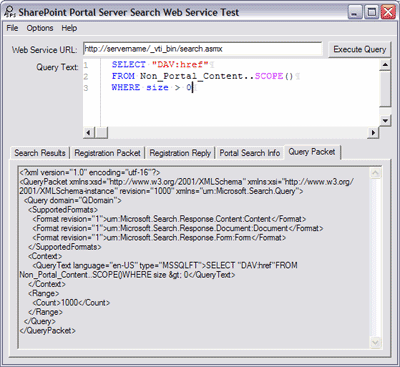
SPS Search Test - Displaying the query packet

Note: While this is a very helpful tool to test out queries and see if they work, I still don't have any real documentation about the form of full-text queries for SPS. I'm working on getting some information from Microsoft on this, to find out which fields I can query for/against and how to determine that for different servers, as well as figuring out what different errors mean. When I have more, I'll update this entry. (The only queries I've gotten to work are variations on SELECT "DAV:href" FROM Non_Portal_Content..SCOPE() WHERE size > 0 so... I'll keep you posted. It doesn't seem to work like the SPS 2001 queries did, though.)

UPDATE: 6/18/04 11:00 AM - It turns out they embed the entire SQL query that gets run on the Advanced Search page right in the source.

Also, I'll be updating the app as I learn more about the search functionality so I can offer more flexibility in the querying.

Download SPSSearchTest 1.1.0 (MSI)
Download SPSSearchTest Source 1.1.0 (ZIP)

Version History
1.1.0:
- Added syntax highlighting for SQL queries using the ICSharpCode.TextEditor control.
- Moved view and query options into menus.
- Now showing the Registration Request packet.
1.0.1 - First public release.
1.0.0 - Internal/unreleased version (still needed more functionality for prime time).

Print | posted @ Friday, June 18, 2004 11:29 AM

Comments on this entry:

Gravatar # Re: SharePoint Portal Server 2003 Search Web Service Tester
by Emmanuel Desigaud at 8/24/2004 2:22 AM

Nice tool. Can be very usefull.
Like you, I was near become crazy with the search.
Hope that next version will have an helper to build the query :)


Gravatar # Re: SharePoint Portal Server 2003 Search Web Service Tester
by Niklas E at 11/30/2004 9:12 AM

I too am really disappointed with the missing documentation in SPS2003 for this query. I want to index meta-tags from other html-pages outside SP, in my case CMS 2002, and they are now indexed successfully, but the data-types are always strings, making it impossible to compare the meta tag (> today's date). There is some old customization example in the platform sdk for index server, but it does not work for me although going through step by step. The example includes compiling c++ files and register them in com+, which seems odd for a 2003 product. It is very strange that SharePoint cannot handle anything else than strings for non-SharePoint searches. And if you are to make some own customization hack, it should at least be .NET code. MS support couldn't help me either since it was not part of the product's funtionality, but a customization of the product.

I have managed to find out how to make * searches. So if you need some more examples, I have some.

Thanks for the app. I too have made some more simple app, not as good as yours, but one thing that my app has that you could add to yours is the choice of Impersonate (current user) or typing in user, password and domain. I make queries to other domains and have to use other credentials.
Gravatar # Re: SharePoint Portal Server 2003 Search Web Service Tester
by Oliver at 12/21/2004 8:43 AM

Hi,

I am totally confused with search.asmx.
I have web part where I am making search by sending xml query to search.asmx.
When I check results no matter how many documents I have in SharePoint I will
see only 10 of them in results xml.

When I run same xml query in your application I will get all documents.

Here is my code to make instance of search :


private PrimaNavigationWebPart.SPSSearch.QueryService m_webService = null;

m_webService = new PrimaNavigationWebPart.SPSSearch.QueryService();

m_webService.Url = searchServiceUrl;

m_webService.Credentials = m_credentials;

m_webService.RequestEncoding = Encoding.UTF8;

result = m_webService.Query(query);

Credentials and searchServiceUrl are ok because search works (not correctly but it works).

Do you have any idea how I can force search.asmx to return all results ?

Sorry because I am writing to you but I spent more than few days trying to find solution
and I am not even close (except that I know that you tool works good ;-) ).

Thanks,
Oliver
Gravatar # Re: SharePoint Portal Server 2003 Search Web Service Tester
by Travis at 12/22/2004 6:08 PM

Unfortunately, I really can't offer technical support on the inner workings of the SharePoint search web service. I offer the application as a means for testing and troubleshooting, however, beyond that, diagnosing precisely why your use of the web service doesn't quite work is beyond my abilities.

The best I can offer you is this: Use my search service tool to get the results you are looking for. Then examine the packet it's generated closely for the contents. In this case, you'll notice that there are settings you pass in the query to tell the service how many results to return (I believe it's the "Range" element in the packet). I'd be willing to wager that if you omit that setting, it defaults to only returning 10 results.

I can't recommend more that you thoroughly investigate the links I've placed in the article here - they link to the schema description, SDK documentation, and other things you'll need to know to diagnose your problem.

I also recommend if you continue running into trouble that you open a developer support call with Microsoft. They need to know people are out here using this stuff and that documentation and examples for the search service shouldn't keep getting put on the back burner.

Good luck with your project.
Gravatar # Re: SharePoint Portal Server 2003 Search Web Service Tester
by pigcatcher at 2/17/2005 3:14 PM

Error setting processing query: The underlying connection was closed: The proxy name could not be resolved, verify correct proxy configuration.
Gravatar # Re: SharePoint Portal Server 2003 Search Web Service Tester
by pigcatcher at 2/17/2005 3:21 PM

Oops, did not finish the question,

I did some test but receive error message like this

"Error setting processing query: The underlying connection was closed: The proxy name could not be resolved, verify correct proxy configuration.", actually I am running the tool on the SPS server, do not know why proxy is involved in this. anything i have to set in IE ?
Gravatar # Re: SharePoint Portal Server 2003 Search Web Service Tester
by Travis at 2/17/2005 6:20 PM

As mentioned before, I don't really have time to offer technical support with SharePoint Portal Server. I vaguely recall the setup documentation for SPS discussing proxy settings. I would recommend looking through the SPS documentation for a solution. Sorry I couldn't be of more assistance.
Gravatar # The Boiler Room - Mark Kruger, SharePoint MVP : SharePoint Web Parts: Free 3rd Party SharePoint Web Parts & Tools
by www.sharepointblogs.com at 6/1/2006 2:47 PM

Your comment:

Title:
Name:
Email:
Website:
 
Italic Underline Blockquote Hyperlink
 
 
Please add 6 and 7 and type the answer here: