
MediaPortal and DVD ISO Seems To Work
I blogged a bit ago that I was going to try MediaPortal and Daemon Tools as a solution for storing all of my DVDs on a home theater PC and having it work like a big movie jukebox - but with hard drives instead of DVDs.
I have the day off, so I thought I’d give it a run.
I downloaded Daemon Tools and installed it. Fine. I downloaded MediaPortal and installed it. Fine. Spent quite some time configuring MediaPortal and trolling through the available options (there are a lot). I got all of that set up to a point where I figured it would work. I configured MediaPortal to know where Daemon Tools got installed and was ready to go.
I grabbed a movie at random from the cabinet in the other room (it happened to be Collateral Damage) and brought it into the computer room to get an ISO of the disc. ISO ripped, software installed, ready to rumble.
Fired up MediaPortal, told it where to get the ISO I just ripped. That’s when I ran into the first complaint I have about MediaPortal - pretty much any configuration option you change requires a full restart of the application. Add a new folder where movies are stored - restart. Add the extension “.iso” as a movie extension - restart. Lame.
Finally got all that configured and found the ISO. Clicked it to play, and Daemon Tools pops a warning about secure command lines. Click OK a bunch of times and set Daemon Tools to not be in secure mode. In the meantime, MediaPortal isn’t doing anything. Try again.
Clicked the ISO again and MediaPortal tells me it’s loading, but nothing seems to be happening… until the stupid InterActual media player thing fires up and tries to install. No, no, I don’t want that. I just want to see the movie. Cancel install.
No luck. After fussing around with it for some time, it looks like MediaPortal will generally defer to the default movie player assigned when it uses the ISO stuff.
I decided to try it with a regular DVD and the magic combo for that seems to be to disable any autoplay for DVD movies. Even then, the playback seems to be a little choppy. Of course, that might just be my hardware setup - it’s really not designed for this sort of thing.
Back to the ISO now that I have the DVD stuff mostly working. It’s still giving me the stupid InterActual player notification.
I messed around with it for a lot longer and there are two things that need to be done to get this thing to work.
First, set up the Daemon Tools virtual drive so it does not give the Auto Insert Notification. This is key so when the ISO is mounted it doesn’t do its autoplay garbage and try to install crap.
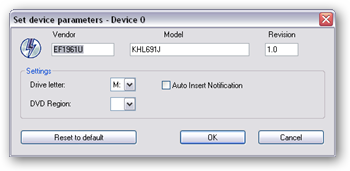
Second, in the MediaPortal configuration, make sure the drive letter that MediaPortal is using for the Daemon Tools drive matches the one you set up to not autoplay. I’ve set Daemon Tools drive 0 to be drive ‘M:’ (for “movies”). MediaPortal needs to know that information, too.
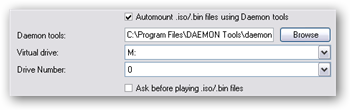
Once you do that, things seem to work. But it’s definitely an undocumented process in getting the planets to align.
Now I just have to figure out whether it’s going to be worth it. You can get hard drives cheap, but I’m going to have to get a new computer for this (connected to the TV) with all of the stuff fast enough to work in this configuration. I can probably put it together for not a lot, but when all is said and done I’m sure I’ll be looking at a couple of grand or more. I also need to figure out how the integration with DVD Profiler works (if it integrates at all) since I have all of my movies cataloged in there.