Google Talk Task Bar Focus Problem

I use Google Talk and like it as a reasonable chat client, but the primary use I have for it is the mail notification for Gmail.

To get to your Gmail inbox from Google Talk, you right-click the icon in the Windows task bar and a little menu pops up and lets you choose "Inbox." The problem I'm having is that it doesn't always quite work. You not only get the Google Talk menu, but also the standard task bar menu:
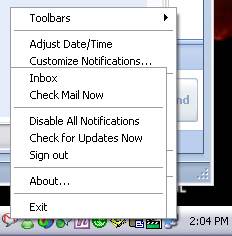
Google Talk focus issue

If you left-click the task bar first, then right-click the Google Talk icon, everything works. If you dive in and right-click the Google Talk icon directly, this weird focus thing happens. What gives?

Print | posted @ Wednesday, February 28, 2007 3:07 PM

Comments on this entry:

Gravatar # re: Google Talk Task Bar Focus Problem
by omadmedia at 6/22/2007 2:56 PM

I have the same problem.
after what i red here: http://forums.tweakguides.com/showthread.php?s=2e49d700631bca8484132165e32b3ce0&t=5610&page=2
i think it's a problem of timing.
if you click while the tool tip containing the name of the application appears, it looks like both menus appear. if you wait so it will completely fade in, only one menu will show up.

try it, am i right?
it is annoying!!!
Gravatar # re: Google Talk Task Bar Focus Problem
by Travis Illig at 6/22/2007 3:03 PM

Holy crap, you're right! If I bust down there and reallyquickclick I don't get the double menu. Wait a fraction of a second (about the time the tooltip is going to come up), and there's the double menu. If I wait to click until after the tooltip, no double menu.

Now the question is - how do you fix it?
Gravatar # re: Google Talk Task Bar Focus Problem
by omadmedia at 6/23/2007 1:21 AM

i have nooo idea.
i guess this doesn't have a fix yet.

happy to get your answer ;)
Gravatar # re: Google Talk Task Bar Focus Problem
by jyothi at 6/14/2008 12:33 AM

how to fix the google icon on the task bar
Gravatar # re: Google Talk Task Bar Focus Problem
by DougNoTronik at 6/18/2008 7:16 AM

Well, it isn't 100% but it helps...

WinXP
right click my computer
choose properties
click the advanced tab
click the Settings button in the Performance group
Uncheck the box "Fade or slide ToolTips into view"
Click ok.

This makes the tooltip appear instantly instead of fading. Seems to occur less often now.
Gravatar # re: Google Talk Task Bar Focus Problem
by Mike O. at 7/18/2008 2:11 PM

Wow. I have this problem with things other than google mail. I was able to reproduce it with iTunes specifically following the user's advice above about waiting for the tooltip. I've disabled the "sliding" so hopefully that works.
Gravatar # re: Google Talk Task Bar Focus Problem
by Mike O. at 7/18/2008 2:26 PM

Nope. Still happens!!!

Your comment:

Title:
Name:
Email:
Website:
 
Italic Underline Blockquote Hyperlink
 
 
Please add 1 and 8 and type the answer here: