
Xbox Live DRM Eating My Lunch
Way, way back on September 21, my third Xbox 360 crapped out on me and I had to get it repaired. They sent me a fourth Xbox and I got to face the Xbox Live DRM beast for the third time.
Let me recap the DRM problem for posterity:
When you purchase an Xbox Live Arcade game (or a theme, or some gamer pics, or video, or whatever), the content gets licensed to two things: your Xbox Live gamer profile and the console that you originally purchased the content on. That means that I can buy Pac Man and my wife can fire up the Xbox and play without me being logged in, even though I was the one who bought it. This is key since I might buy us a game we both want to play and I sometimes take my profile to friends’ houses to play so I’m not there to log in.
When you get your console repaired and they send you a new console, the content is only licensed to your gamer profile. Further, because of that, you need to be logged in to Xbox Live in order to use it - you can’t use it offline. What this translates to is that if I buy Pac Man and my wife wants to play it, she has to log in, then she has to start up a second controller and log me in so the game is activated and she can play. This breaks down if the network is down, if Xbox Live is down, or if I’ve taken my profile elsewhere.
This latest time around, they changed up the process so now, rather than getting “points after repair” to re-purchase your stuff, you have to have them flip some bits on their end to let you delete and re-download your content. Hypothetically, you should be able to delete and re-download and it will fix the need for your profile to be connected to Xbox Live (so you could play things offline) but it doesn’t re-license the console.
Regardless, none of this worked for me. I couldn’t play anything offline and I couldn’t get my console re-licensed.
Following their process, I opened a call with them to get this resolved. On October 27, it was “escalated to Microsoft Support” and there should have been a resolution in 30 days. I’ve called back a few times after the 30 day mark and get a lot of “we’ll call you back in 5 business days” extensions, but no one ever calls. Needless to say, I’m pissed.
This compounded with the latest dashboard update that was released last week. I tried logging in on Friday and was told that there was a dashboard update to take before I could connect to Xbox Live.
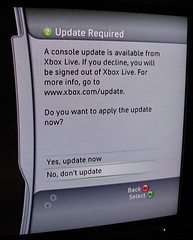
No problem - I told it to take the update. Instantly I got a “can’t download this update” message.
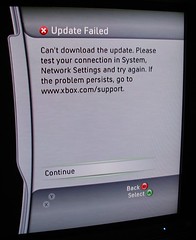
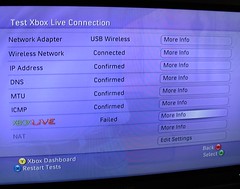
Huh? I tested the network connection and got success (up until the Xbox Live portion of the test, which won’t connect to Xbox Live unless you take the update, which is my problem.)
So I called Xbox Live Support. I ran them through my existing issue (still waiting on the DRM solution) before explaining that now I have an all new issue.
Normally I am reasonably tolerant of their support. They walk you through some basic troubleshooting steps and get you a supervisor if they can’t resolve it. Not this time. Oh, no, not this time.
This time the guy, who barely spoke intelligible English, started with some basic troubleshooting - test the network connection, etc. - then went into “more drastic measures” mode. First he tried to convince me that changing my home network around so I connect the Xbox directly to the cable modem would solve it. No, I don’t think I’m going to do that because I’m pretty sure the network connection test passed. Then he said I needed to “delete all of my game data.”
Whoa, whoa, whoa. What?
Yeah, “delete all of my game data.” That includes arcade games, saved game data, everything. I prompted the guy, asking him, “um, wouldn’t it be OK if I just moved it to a memory card?” “Oh, yeah,” he said, “you could do that, too.” Brilliance.
So I start moving all of my saved games over to my 64MB memory card while I’m on hold and he’s researching things. I quickly realize that I have a lot of saved games - some to games I don’t even own anymore - so I do some housekeeping, too. I delete the arcade games I know I can re-download anyway and start moving my important saved games over to the memory card. I got about halfway in when I actually found a saved game that refused to be moved, and that was about the time when the support guy came back on the phone. I asked him what to do.
“You mean the saved game won’t let you move it to a new device?” No, that’s the problem. “Wow… uh… can you copy it?” Sure, copying works, but will that affect anything? “Um… uh… How far have you gotten in copying your data?” Not far. “Do you have a memory card that will hold all of your data?” No - I have 2.2GB of data and a 64MB memory card. You do the math. “Hmmm… uh, well, before you finish doing that, I have something else to try.”
An alternative? Okay, let’s do it.
“Delete your profile. When it asks you to delete profile and items, just say to delete the profile only. We’re going to do a profile recovery and see if that fixes things.” Are you sure? I’ve tried getting this update with five different profiles here and it’s not working. I’m pretty sure it’s not my profile. “Yeah, just go ahead and do that.”
So I did. Deleted my profile. I’ve had to recover my profile before, so I didn’t think it’d be a big deal…
…except that you have to connect to Xbox Live to recover your profile and I can’t connect to Xbox Live because I can’t take the new dashboard update.
Well, shit.
See, now my Xbox is pretty effectively bricked. I don’t have my profile and I can’t recover it. Jenn can’t play any of the arcade games we have because you have to have my profile logged in for them to work. I can’t move my remaining saved game data off the hard drive because you have to be logged in to do that, so I can’t finish testing the guy’s “saved game data” theory.
This was the point where I lost my cool. I didn’t cuss the guy out because, well, that’s not terribly productive. But I did tell him that we’ve entered the realm of “you guys need to compensate me for this crap because, through no fault of my own, I’ve now got a doorstop sitting in the middle of my home theater and service that I’ve paid for is not being rendered to me.”
The support guy, ever apologetic, agreed.
And now this call has been escalated to “Microsoft Support” and I should hear back sometime today. Forgive me if I don’t have a lot of confidence in that, seeing as how the last call that got escalated has somehow been lost in the ether.
Good going, Xbox DRM people. Thanks for everything.
UPDATE: The problem was corruption on my hard drive. They ended up sending me a new hard drive.