
Dell Studio Hybrid Media Center Installed
I had the Windows Media Center DVD Library set up, I upgraded my Windows Home Server to have capacity to store my movies, so the last step was to get a home theater PC in the living room so I could play the DVD images off the network. (This is all part of my overall media center solution.)
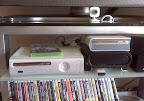
The Dell Studio Hybrid is the little black box under the Xbox 360 HD DVD drive. [From Studio Hybrid Media Center]
After some research and pricing, I ended up getting a Dell Studio Hybrid PC from Best Buy. Dollar for dollar, I got more horsepower than if I had gone with a Mac Mini, and I didn’t have to get a separate Windows Vista license. It came with Vista Home Premium (which includes Media Center), a dual core 2.1GHz processor, 3GB RAM, wireless-N built-in, DVI and HDMI output… basically, it was set to go as a Media Center, and it was $50 less than the better of the two currently offered Mac Mini models.
Installation was a snap. There were (obviously) a few fiddly things to deal with like setting up the media center user account, connecting it to my Windows Home Server for backup, setting up Windows Media Center to find all of my media… but really no major hiccups. The Windows Media Center setup wizards are fantastic and really get you going in great shape quickly.
There are only a couple of things I need to deal with, neither of which are showstoppers so much as generally annoying.
-
Monitor resolution. When you’ve got a home theater PC, your TV is effectively your monitor. Unfortunately, my TV only supports a certain number of resolutions, only a few of which are also supported by the out-of-the-box video card and drivers that came with the PC. To that end, I have things displaying at 1280 x 768, which is nice and crisp (and supported on my TV) but leaves a bit of a black letterbox on the right and left sides of the screen since the full resolution of the TV is 1366 x 768. I may look into an application like PowerStrip to see if I can tweak the card into displaying a full resolution, but then, the half-inch letterbox on either side of the screen really isn’t killing us, either.
UPDATE: Several forums report PowerStrip doesn’t work with Intel integrated graphics cards, which the Hybrid has. There is a tool called DTDCalc that is supposed to do some craziness to get things to work, but it looks pretty hacky to me (or at least it doesn’t abstract me away from the hackiness much) and involves knowing about VESA standard timings and such. Yow. Anyway, for those bold enough to take that leap, there it is.
UPDATE 2: I tested out connecting the Hybrid to the TV using an HDMI cable rather than the DVI cable I was using. When doing that, I had several new resolution options to choose from including 1920x1080i. My TV didn’t really “like” that resolution and didn’t display it properly (things stretched off the screen and flickered really bad) but the experiment proved out - the information coming in from the TV is what tells the PC the resolutions it supports. It’s an older TV and I’m planning on getting an upgrade soon, so hopefully the new TV will better support the signal.
UPDATE 3: I got a Samsung LN52A750, hooked the PC up via HDMI, and instantly got full 1080p high-def output. No tweak required. No letterboxing along the sides. Everything looks brilliant. Whew!
- Remote control IR frequency conflict. The Media Center remote control and IR receiver that I bought, which is a nice yet inexpensive unit, happens to use the exact same infrared frequency as the Xbox 360 so when you turn on/off the PC with the control, it also turns on/off the Xbox 360. Since I rarely use the Xbox 360 remote (only when watching HD DVDs) I’ll probably find some sort of temporary cover for the IR receiver port on the 360 so I can cover/uncover it as needed.
-
Windows Home Server backup and machine sleep. When you “turn the PC off” with the remote, you’re really putting it to sleep. When Windows Home Server connects to the PC to back it up, it wakes the PC up. Unfortunately, it isn’t going back to sleep after that. I need to work on the power settings so it goes back to sleep when it’s done backing up.
UPDATE: I fixed this by changing the sleep time to a lower number (10 minutes) and switching the screen saver to one of the simpler ones like “Windows Logo.”
UPDATE 2: I had some issues getting the HDMI signal to come back if I put the PC to sleep while the TV was off. It looks like getting a little HDMI switchbox fixes that.
I’ll put together a network diagram soon so folks can see how the whole system came together. I’ve been looking at solutions to my media center problem for almost two years to the date, so it’s nice to finally have it solved.